

The Attendance Assistant notices absences, reaches out to families, and records what they say
It's 9:15 on a Tuesday morning. First period attendance is in, and the report is long. Somebody in the front office (maybe it's you) prints the list, picks up the phone, and starts working through it. Hi, this is the school, we noticed Maya wasn't in class today...
It's important work. Research is clear that early, friendly outreach about absences changes outcomes: families often don't realize how quickly missed days add up, and a quick check-in catches small problems before they become big ones. But it's also repetitive work. Most of those calls end the same way: she has a fever, she'll be back Thursday. And on a busy morning, the list doesn't always get finished. The families who most need a real conversation are buried somewhere in a stack of routine sick days.
The Attendance Assistant is our answer to that morning. It's a teammate that handles the routine first pass: noticing the absences your school cares about, reaching out to families, recording what they say, and raising its hand the moment something needs a real person. Here's a tour of how it works, following one absence all the way through.
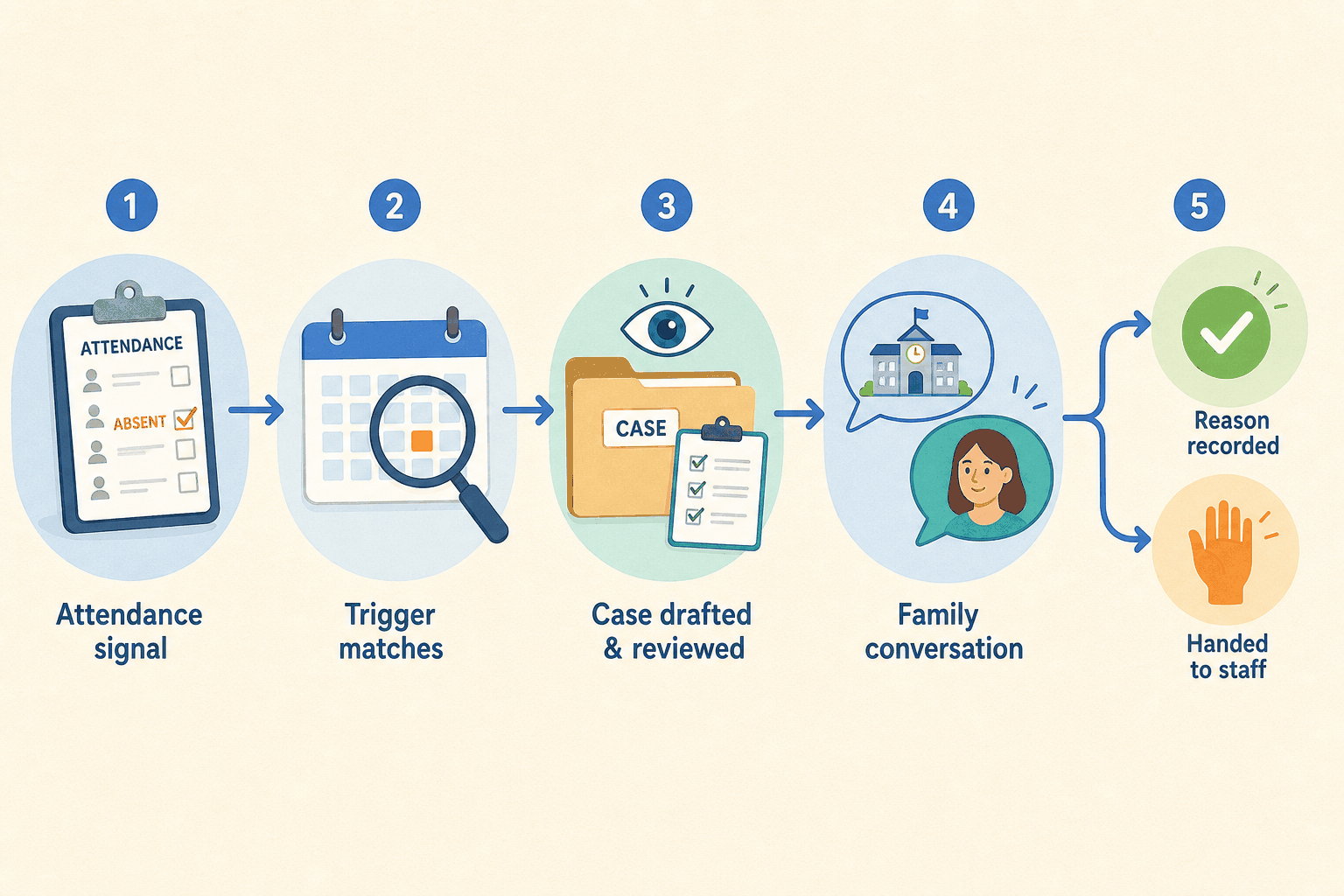
Every school thinks about attendance a little differently. Some want a same-day check-in for any absence. Others care most about patterns, like the student who has quietly missed six days this month, or keeps missing the same class.
So the first thing a school does is set up triggers: plain rules that say "this situation is worth a conversation." A couple of examples:
- Reach out the same day a student is marked absent.
- Reach out when a student has missed a class several times this month.
The school writes the rules; the assistant watches for them. Some triggers fire in real time, the moment attendance is recorded. Others run on a schedule, like a nightly sweep that looks for slower-building patterns across every student. Staff can also point a trigger at a specific group of students and say "check these now."
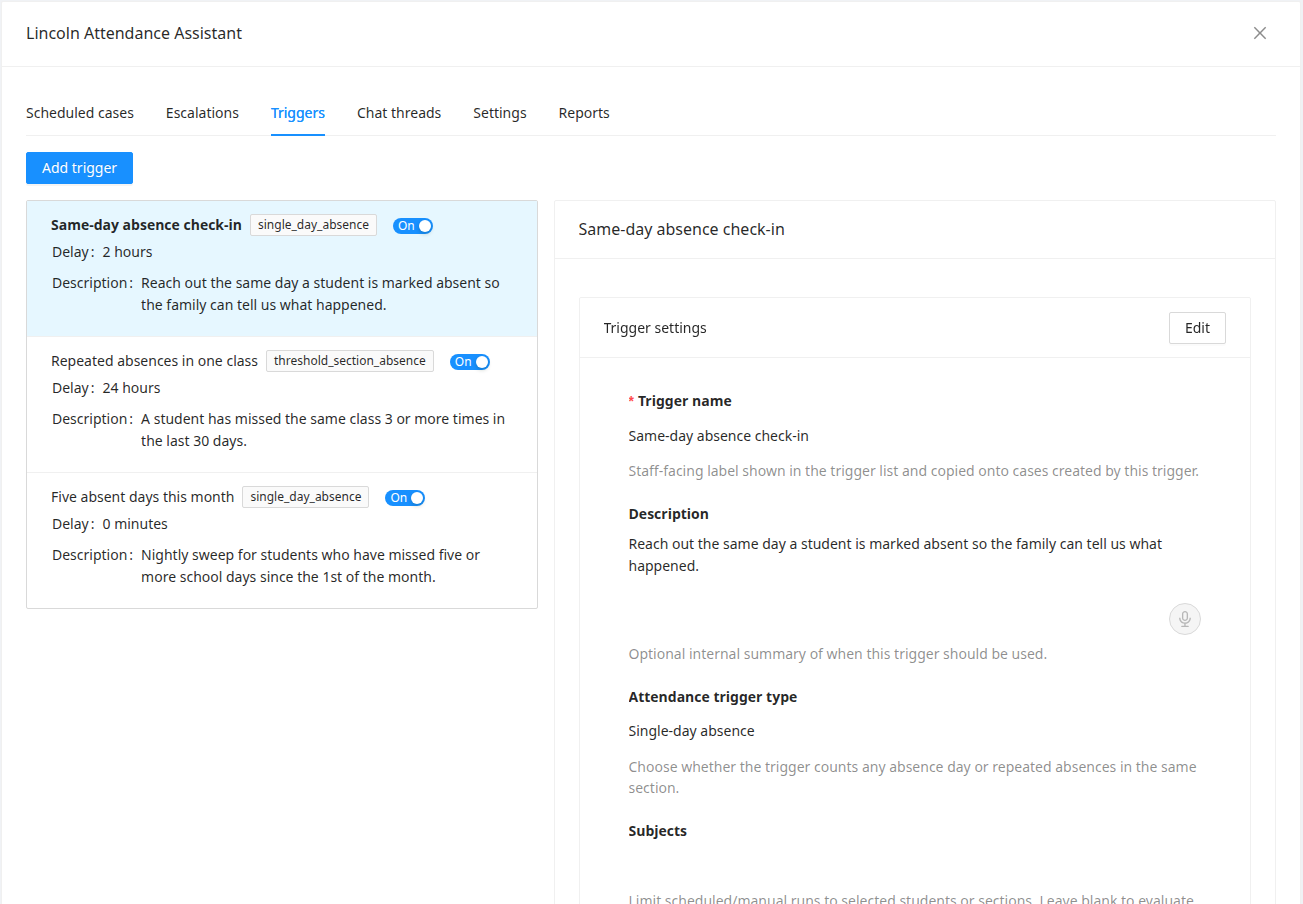
One thing worth saying clearly: deciding when to reach out isn't an AI judgment call. It's a rule your school wrote, and it either matched or it didn't. (Part 2 of this series is all about how that matching works.)
When a trigger matches, the assistant opens a case: a single, organized workspace for that student's situation. Inside the case, the assistant drafts two things: a proposed message to the family, and a short summary for staff explaining what it noticed and why.

Typically, a case doesn't send immediately. It sits on a delay the school configures, like "wait 24 hours." That waiting period gives the ordinary *she's home sick* call time to come in first (and if attendance gets corrected in the meantime, the case simply doesn't send). When the delay is up, the case launches on its own; no one has to press a button for the routine ones.

Every case is visible in the queue the whole time, and staff can always step in to send one early, edit the plan, or cancel it, because sometimes you know something the attendance data doesn't. And for triggers where a school wants a firmer hand, there's an optional approval step: turn on review for that rule, and its cases wait for a person before anything sends.
When a case launches, the family gets a short, friendly message by text or email, through the same communication channels the school already uses, going to the same contacts families have already set up with the school. Each trigger can even set the channel order: try a text first, fall back to email, or the reverse. There's no new app to download and no separate robot phone number. It looks and feels like a message from school, because it is one.
Then the conversation happens like any other:
School: Hi! This is Lincoln Elementary. We missed Maya at school today and wanted to check in. Is everything okay?
Parent: Hi, yes. She woke up with a fever. Keeping her home until it breaks. Probably back Thursday.
School: Thanks for letting us know, and we hope she feels better soon! We'll note that she's expected back Thursday. If anything changes, just reply here.

Behind the scenes, the assistant is doing something quietly useful: it's turning that conversation into a structured record. The reason (illness), the expected return date (Thursday), whether a doctor's note is expected. All of it captured as tidy fields on the case. When staff open it later, they see the summary at a glance instead of scrolling a text thread. The assistant keeps its side of the conversation brief and polite, asks at most one question at a time, and doesn't wander. It's not there to chat; it's there to check in and take good notes.

Here's the feature we'd argue is the most important one, even though it's about the assistant not doing something.
Some conversations shouldn't be handled by software. A parent asks for a phone call. A family mentions a housing situation, or transportation trouble, or something that clearly needs real support. Or nobody responds at all, day after day.

In those moments, the assistant opens an escalation: a clear, deliberate handoff to staff. The right person gets notified, sees the full conversation and everything the case has gathered, and picks up right where things left off. Escalations have their own little lifecycle (opened, acknowledged, resolved), so a handoff can't quietly fall into the gap between "the assistant was handling it" and "a person is handling it."

Schools shape this behavior too. You can tell the assistant which staff member should get which kinds of situations, and describe in plain English when to hand off rather than keep asking questions. (Part 3 digs into exactly how that works, with examples.)
And for the quiet cases: follow-up rules keep time in the background. If a family hasn't responded after a delay the school chooses, the case can send a gentle nudge, be marked as no-response, escalate to staff, or close. Whatever the school configured for that trigger.
Everything that happens lands on a timeline attached to the case: the trigger that fired, the drafted plan, who approved it, every message, every follow-up, every escalation. If a question ever comes up ("why did this family get a message?" "what did we say?"), the answer is right there, in order, with timestamps.

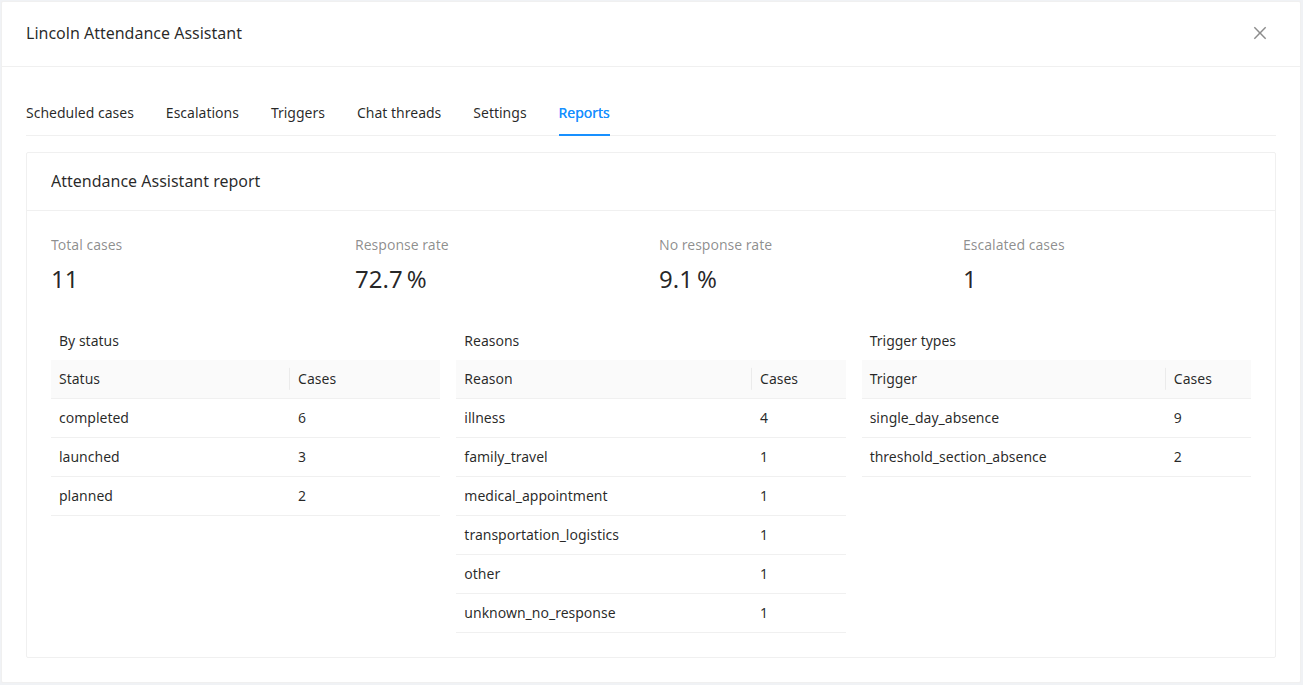
Zoom out and there are simple reports across all cases: how many families responded, the most common absence reasons, how many cases needed a person, how each trigger is performing. It's the kind of picture that used to require a spreadsheet and a free afternoon.
The Attendance Assistant is not autopilot, and it's not a replacement for your attendance team. It keeps a visible case queue, launch delays, optional review, human escalation, conservative defaults about who gets contacted, and a full audit trail, precisely because attendance is about families and trust.
What it changes is the shape of the morning. Instead of we have forty absences to chase, it's we have three conversations that need a person today, and the assistant already knows which three.